
Cage: Run AI Coding Agents Without Fear
AI coding agents like Claude Code and Codex are becoming indespensable — but to unlock their full potential, you need to give them
--dangerously-skip-permissions. That flag is named the way it is for a reason. An agent with unrestricted shell access on your host machine canrm -rfyour home directory, overwrite your SSH keys, or trash your global git config. It probably won’t. But probably isn’t great when the downside is catastrophic.I wanted a way to let agents run unrestricted without any of that risk. Cage enables that.
What It Does
Cage wraps Docker (or Colima or Podman) to create isolated containers for each project. Your project directory is mounted read-write at the same absolute path as on the host — so error messages, file references, and tooling all just work. Everything else is sandboxed.
brew install pacificsky/cage
cd ~/src/my-project
cage start
claude --dangerously-skip-permissions
That’s it. Run
cage startagain from the same directory and it re-attaches to the existing container. Runcage shellin another terminal to open a second shell while an agent is working. Port forwarding for web apps is a flag away:cage start -p 3000:3000 -p 5432:5432How It Works
Each project gets a deterministic container name —
cage-<dirname>-<8char-sha256>— derived from the absolute path. No collisions, no guessing, no state files.Three mounts make it feel like you never left your host:
Host Container Purpose Project directory Same absolute path Code editing with matching error paths cage-home(Docker volume)/home/vscodeShared home across all cages SSH agent socket Forwarded Git push/pull just works The shared home volume is the key ergonomic decision. Claude credentials, git config, shell history, API keys — configure them once and every cage container picks them up. No per-project credential dance.
Why This Is Safe
The safety model is simple: the agent can do whatever it wants inside the container, but the only piece of your host it can touch is the project directory you explicitly mounted. There’s no access to your home directory, no way to install global packages, no ability to modify system files or other projects.
If an agent goes off the rails — runs a destructive command, corrupts its environment, installs something bizarre — the blast radius is contained. Run
cage restartand you’re back to a clean container in seconds, with your project files and shared home volume untouched.Your host system never sees
--dangerously-skip-permissions. The agent runs unrestricted inside a throwaway container. That’s the whole idea.Design Decisions
Same-path mounts. Most container tools mount your project at
/workspaceor/app. That means every file path in every error message is wrong. When an agent says “see line 42 of/Users/you/src/project/foo.py”, that path should actually exist. Cage mounts at the original absolute path so everything matches.Seed directory.
~/.config/cage/home/contents are copied into the shared home volume withcp -n(no-clobber) on every new container. Drop your.zshrc,.gitconfig, or Claude settings in there once. Existing files in the volume are never overwritten — your running config is always preserved.Environment file hierarchy. Global env vars go in
~/.config/cage/env, per-project overrides go in.cage.env. Both are optional, both use Docker’s native env-file format. API keys, database URLs, feature flags — injected at container creation without baking them into images.SSH agent forwarding. On macOS, host sockets can’t be bind-mounted across the VM boundary. Cage detects whether you’re running Docker Desktop or Colima and uses the appropriate VM-internal proxy socket. On Linux, it bind-mounts the host socket directly. If you’re on Colima without
--ssh-agentenabled, Cage warns you instead of silently failing.Runtime detection. Cage prefers
dockerbut falls back topodmanautomatically. The entire tool is a single bash script — no dependencies beyond a container runtime.What It’s Not
Cage isn’t a devcontainer manager or a cloud development environment. It doesn’t try to define your toolchain, install language runtimes, or manage VS Code extensions. It’s a thin isolation layer: put an agent in a box, mount your code, get out of the way.
The source is on GitHub and MIT licensed. If you’re running coding agents on your machine and want to stop worrying about what they might do, give it a try.
TuneBoss: Turn an Old iPhone into an Always-On Spotify Display
I built TuneBoss because I wanted a dedicated screen showing what’s playing on Spotify — something I could mount under my monitor and forget about. No app switching, no phone unlocking, just a permanent glanceable display with album art and visuals that react to the music.
It’s open source, self-hosted, and runs on a Raspberry Pi, NAS, Proxmox, home server or anywhere you run docker containers.
What It Does
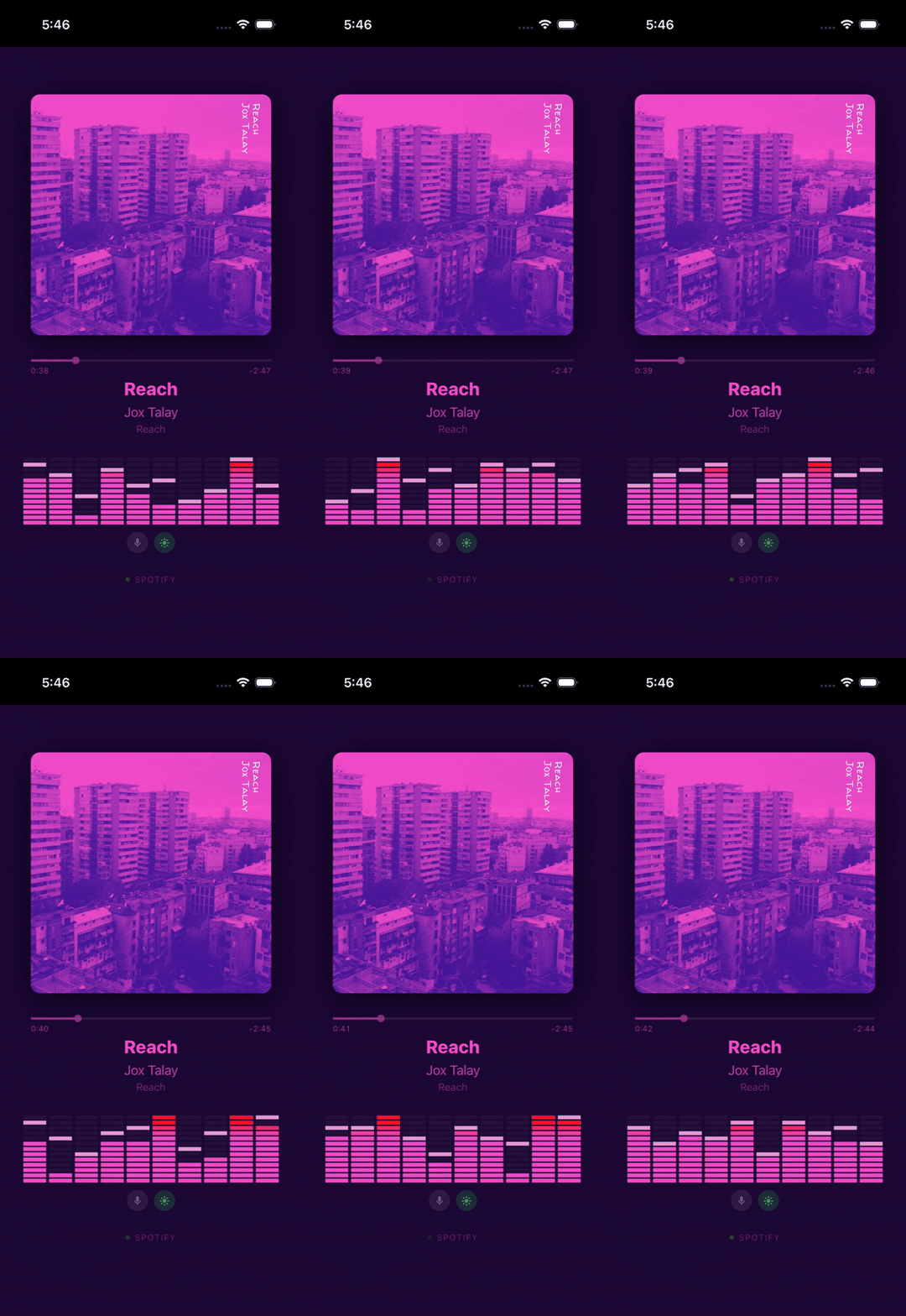
TuneBoss polls the Spotify API from a lightweight Node.js backend and pushes track updates over WebSocket to a Vue 3 Progressive Web App. The display shows:
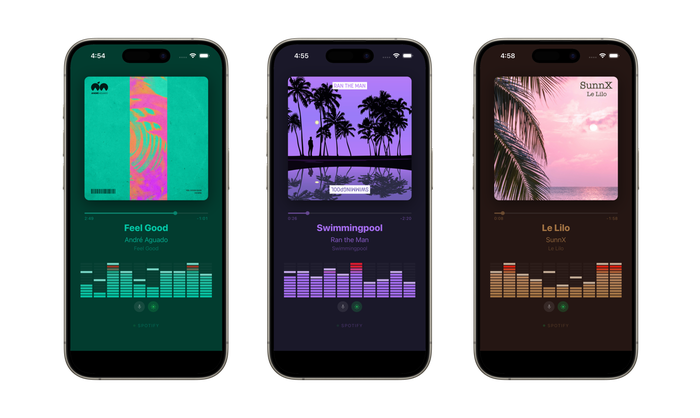
- Album art with colors extracted from the cover — background, text, and visualizer bars all adapt to every track
- A 10-band spectrum analyzer running at 60 fps, with procedurally generated visuals unique to each song
- Track progress interpolated smoothly between server polls
- Optional microphone mode that captures real ambient audio for actual FFT-based spectrum data
The whole thing runs fullscreen in portrait mode on the iPhone, with the screen wake lock keeping it on indefinitely. Install it as a PWA from Safari and it behaves like a native app — no browser chrome, no accidental navigation.
Why Not Just Use Spotify’s App?
Because Spotify’s app wants to be the thing you’re interacting with. I wanted a display that sits there passively — a piece of ambient information, not another app demanding attention. TuneBoss is a single-purpose appliance: the iPhone becomes a music screen and nothing else.
Architecture
iPhone (Safari PWA)  ◄──── WebSocket ────►  Node.js Backend
                                                  │
                                            Spotify Web API
                                          (poll every 3 seconds)
The backend handles all OAuth credentials and API communication. The iPhone is completely stateless — it just renders whatever the server sends. No Spotify tokens ever touch the client.
Polling is client-gated: the server only hits the Spotify API while someone is actually watching. Close the display and it stops polling immediately.
The Spectrum Analyzer
Spotify deprecated their audio analysis endpoint in late 2024, so TuneBoss generates its own visuals. Each track ID is hashed to seed a deterministic random number generator that produces a unique BPM, oscillator shapes, and per-band wave patterns. The same song always produces the same visualization.
For something closer to reality, there’s an optional microphone mode. It captures ambient audio through the Web Audio API, maps FFT data to 10 logarithmic frequency bands, and crossfades smoothly between the procedural and real-time spectrum when music is detected.
Running It
TuneBoss is Docker-ready. Set your Spotify API credentials, run the container, and open the URL on your phone:
docker compose up -dIt also runs bare-metal with Node.js, or behind Caddy for automatic HTTPS on a homelab. Full setup instructions are in the repo.
On the iPhone side: open the URL in Safari, tap Share → Add to Home Screen, and you’re done. For a truly locked-down display, enable Guided Access in iOS accessibility settings.
Building with AI
Tuneboss was built almost entirely by Claude Code. I prompted it and steered it when it got stuck on a few bugs - particularly on acquiring the iOS wake lock to keep the screen alive. But otherwise, Claude gets the credit for the software engineering.
Get It
TuneBoss is MIT licensed and available on GitHub:
Contributions and feedback are welcome — open an issue if you have ideas or run into problems.
A prediction about Superintelligence and AGI
From a sobering prediction on a possible future evolution path of super intelligence from the current state of AI titled “AI 2027”:
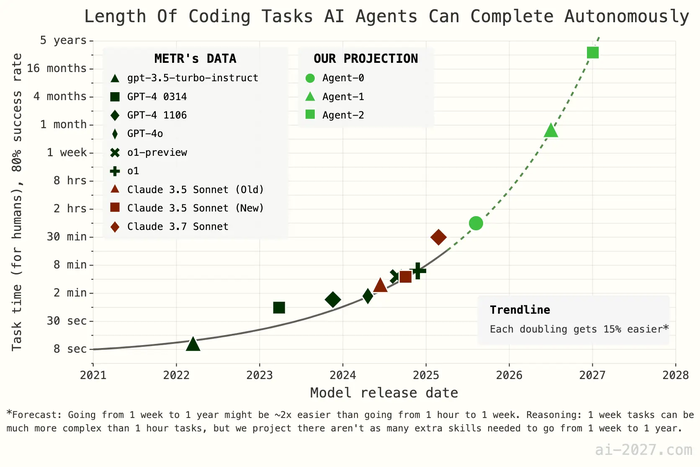
What do you think - is this speedup likely?
Personally I am doubtful we will be able to achieve this level of speedup so quickly, but then again the article does call out most industry professionals have consistently underestimated (and continue to do so) the speed at which AI technology is evolving.
It certainly will have a dramatic impact on the software industry – it already is with the current crop of agents like Github Copilot, Claude Code and their brethren.
The Vestaboard split-flap display
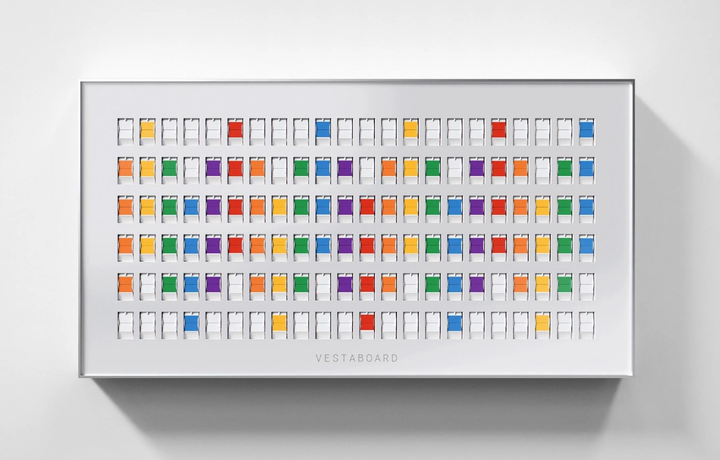
I absolutely love the Vestaboard split flap display.
I only wish it wasn’t so damn expensive.
Cost of experimenting with tokens
Recent discussion around costs of LLM tokens and whether it stifles experimentation in the context of “vibe coding”.
IMHO I think all token costs trend to zero and the answer is NO.
You might end up with “slow tokens” and “fast tokens” where the slow tokens are truly zero (like internet usage at night time being unmetered in many parts of the world) and fast tokens cost a tiny amount of money. But in the long term I think they both trend to the cost of electricity or even lower (because caching kicks in and the tokens are free)
Bridging cloud and local LLMs
I was talking with my classmate Amit Bhor a few days ago about the limitations of inference on the edge, especially around memory requirements of the new MOE models (Deepseek-R1 etc). At the same time, edge inference is pretty desirable for things like privacy, disconnected scenarios, cost etc.
Well, Minions attempts to tackle some of these challenges by adding a way for cloud models to cooperate with local models. The local models handle the interaction with data on your device, whereas the cloud models perform some of the heavy lifting/reasoning.
The claimed gains are impressive:
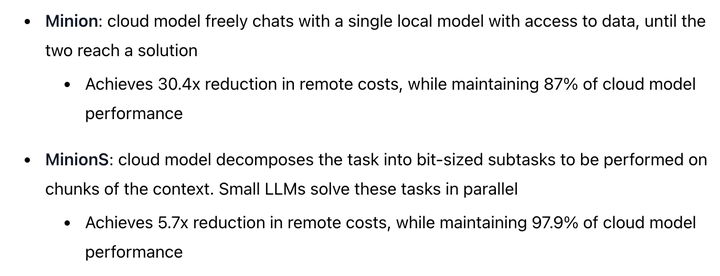
Pretty cool! Techniques like this would make a lot of sense for on-device assistants like Siri or a future smart-home-controller AI.
First Post
This is the blog of Aakash Kambuj. I am determined to post regularly, and this is my first post.
I found https://tld-list.com/ helpful when building this site. It maintains a live list of each gTLD and what registrar is cheapest for initial registration and renewal. That is how I discovered Porkbun.
Friday March 13, 2026
Tuesday February 17, 2026
Wednesday April 16, 2025
Thursday March 20, 2025
Saturday March 08, 2025
Wednesday March 05, 2025
Saturday March 01, 2025
👉🏽 More Posts